
Your single VPS sits at 80% RAM. The database is fighting the app for disk IO. You restart Postgres on a Saturday and everything's fine for two days. You know you need a second machine — but every guide jumps straight to Kubernetes, which is overkill for the next five years of your business.
The honest truth is that almost every "I need to split into multiple boxes" moment is one of three rungs on a short ladder. Most teams never reach the third rung. A lot don't even need the second once they look at the numbers. The trick is knowing which rung you're on, doing only that rung's work, and stopping when the symptoms go away.
This guide walks the ladder in order, with the diagnostic signals, the migration mechanics, and the failure modes that bite at each step.
The signal that you've outgrown one box
A single metric is never a forcing function. Three together are. If your VPS is hitting all three, you have a real capacity problem and not a tuning problem.
Sustained RAM > 80% with disk swap pressure. Run free -m and look at the available column — under 20% of total for hours, not minutes. Then vmstat 5 for a minute. If si (swap-in) and so (swap-out) are non-zero on most rows, the kernel is paging hot memory to disk, and your latency is about to look terrible the next time the working set shifts.
Database IO contention with the app. Run iostat -x 5. Watch the await (average IO wait in ms) and %util columns for your data volume. If %util sits north of 80% during normal traffic and await is over 20ms, your database and your app are queueing for the same spindle or NVMe queue. Restarting Postgres "fixes it for two days" because you've reset the page cache — not because you've fixed anything.
p99 latency degrades during DB checkpoints or backup windows. Look at your APM or your reverse-proxy logs. If p50 stays flat but p99 doubles every time pg_dump runs at 03:00, your worst-case user is paying for your maintenance schedule. That's a structural problem, not a one-off.
None of these alone is enough. All three together mean it's time.
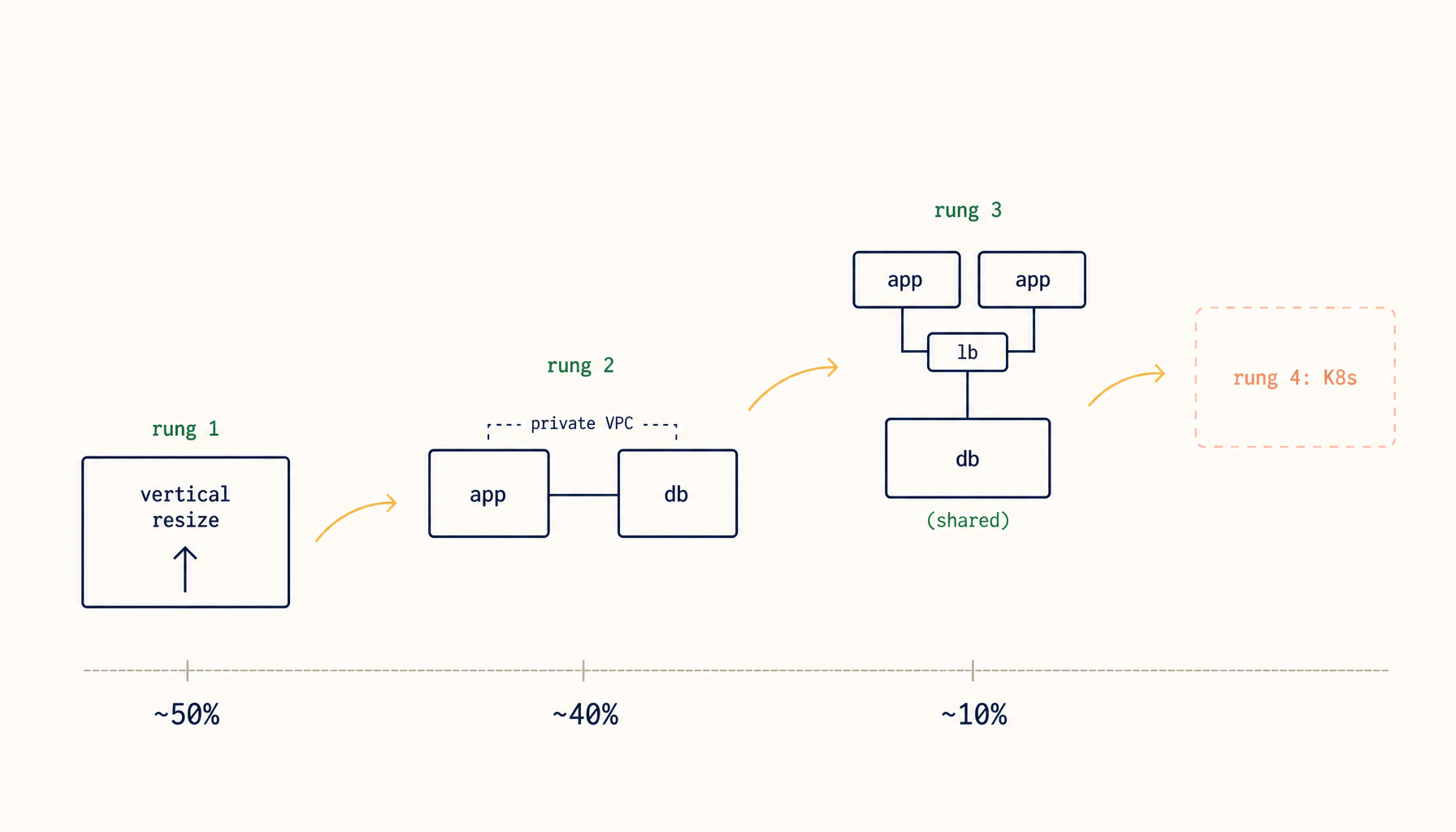
The three rungs of the ladder
Name them up front so you know where you're aiming:
- Rung 1 — vertically scale the box. Double the resources. Cheaper than your time and rarely loses you a night of sleep. Many "I need to split" moments dissolve here.
- Rung 2 — split the database off. A second VPS that runs only Postgres or MySQL or Redis. The app stays on box 1. This is where 90% of small-team production setups land and stay.
- Rung 3 — split the app horizontally. Two or more app instances behind a load balancer, sharing the rung-2 database. Required only when single-app-instance throughput is genuinely the bottleneck.
There is a rung 4. We'll name it at the end so you know what you're choosing not to do.
Rung 1 in detail — vertically scale the box
When the bottleneck is CPU steady-state above 70% with no IO contention, or RAM above 80% but the app (not the DB) is the consumer, the answer is more box, not more boxes. A 4 vCPU / 8 GB instance costs less than two hours of your engineering time per month. You will not regret upgrading first.
How to do it on most providers: take a snapshot from the console, resize the instance, boot. Hetzner, DigitalOcean, Vultr, Linode, OVH all support a console-driven resize that keeps the same IP. Downtime is typically 2 to 5 minutes during the reboot. AWS Lightsail and EC2 require stopping the instance and changing the type, also under 5 minutes. The IP usually does not change, so DNS, firewalls, and reverse-proxy configs stay put.
The one trap: some providers downgrade the disk IO tier when you scale CPU only. If you resize and iostat still shows 90% util, the new shape didn't get more IOPS. Check the provider's instance-type table.
Try rung 1 first. If three months later the same three signals come back, you have a structural problem and rung 2 is your next move.
Rung 2 in detail — split the database off
This is the bulk of the work, and it's the rung most production setups stop at forever.
What moves. The database server, its data volume, and its backup hooks. That is the entire scope. Don't move anything else on the same trip.
What stays. The app, the reverse proxy, cron jobs, queue workers, anything that does not directly speak SQL. Migrating the DB is enough change for one day.
The connection change. Your app's .env switches from DATABASE_URL=postgres://localhost/myapp to DATABASE_URL=postgres://10.0.0.5/myapp, where 10.0.0.5 is the database VPS's private address. Always use a private network. Never the public IP. Both VPSes need to be in the same provider's private VPC, or stitched together with WireGuard or Tailscale. A public-IP database is a Shodan listing waiting to happen, and the egress bandwidth on most providers is metered while private traffic is free.
Latency. In-DC private network adds about 0.3 to 1 ms per query. Your app's p50 climbs slightly. Your p99 usually stays flat or improves, because the app no longer fights the database for IO. If your app does N+1 queries per request, you'll feel that latency multiply — fix the N+1 before you blame the migration.
The cutover sequence. The safest path keeps a fallback at every step:
- Provision the new DB VPS. Install Postgres, configure
pg_hba.conffor the app subnet, and verify the private network reaches it from the app box (pg_isready -h 10.0.0.5). - Restore a fresh dump on the new box ahead of the cutover, so you've proven the path works:
pg_dump -Fc mydb | ssh db-vps "pg_restore -d mydb". - On cutover day, flip a maintenance flag in the app to pause writes for 5 to 30 minutes.
- Take a final dump and restore:
pg_dump -Fc mydb | ssh db-vps "pg_restore --clean --if-exists -d mydb". - Update
DATABASE_URLin the app's.env, restart the app, clear the maintenance flag. - Keep the old database running, read-only, for 24 hours as a fallback. If something blows up, you flip the URL back.
What breaks. Three things, predictably:
pg_hba.confandpostgresql.confon the old DB are usuallylocalhostonly. The new DB has to listen on the private interface and accept connections from the app subnet — not from0.0.0.0/0.- Apps that connect to Postgres through a Unix socket (
/var/run/postgresql/.s.PGSQL.5432) need to switch to TCP. Some ORMs default to socket; check your config. - Cron jobs on the old box that called
psqlorpg_dumpagainstlocalhostnow fail silently. Repoint them at the new host or move them onto the DB VPS.
Once rung 2 is done and stable for a month, you will probably stop here. Most small-team SaaS does.
Rung 3 in detail — split the app horizontally
Most readers will not need this. Read it anyway, so you know what's required when you do.
The prerequisite. Rung 2 done. You cannot horizontal-scale the app without an external database, full stop. Two app instances both pointing at a localhost database is two instances pointing at two different databases.
The new pieces.
- A load balancer in front: HAProxy, Traefik, Caddy, or a managed LB from your provider. Health-check
/healthzon each app, drain on deploy. - Shared session storage if your app has sessions. Redis on the rung-2 DB box is fine for the first year — it's tiny and the network is already there.
- Shared file storage for user uploads. Use S3-compatible object storage (Backblaze B2, Cloudflare R2, Wasabi, or actual S3). Do not bind-mount an NFS share between app instances; you will spend weekends debugging file-locking corner cases.
The two failure modes that bite.
Stale config on one instance. Instance A has the new feature flag, instance B doesn't. Users see flickering behaviour depending on which app they hit. Fix: deploy via a single source of truth (env vars from the load balancer, a config service, or a deploy tool that writes the same config to both boxes atomically). Never SSH into one box to "just patch this real quick."
Cron jobs running on every instance instead of one. You scale to two app instances, and now your nightly billing email fires twice. The cheap fix is flock:
0 3 * * * flock -n /tmp/billing.lock /usr/local/bin/run-billing.sh
Better is to designate one instance as the cron node, or to move scheduled work into a queue worker that only one consumer processes.
The ladder you'll never climb
Rung 4 is auto-scaling, multiple regions, blue-green deploys, full Kubernetes. It exists. It is real engineering. Most small-team SaaS lives at rung 2 forever, and that is fine. The cost of climbing past rung 3 — operational complexity, on-call burden, CI surface area, the people you have to hire to keep it healthy — exceeds the gain unless you are scaling for traffic or compliance, not for an engineering wishlist.
You are not behind for stopping at rung 2. You are not unserious for stopping at rung 1. The point of the ladder is to climb only as far as your symptoms force you.
The honest closing line
Every rung is reversible. If you split the database and the latency hurts more than it helps, you can merge back in an afternoon. If you go horizontal and discover your app has a hidden dependency on local disk, you can collapse to one instance and fix the bug. The boxes are cattle, not pets. The point is to know which rung you're on, not to climb every rung.
Related in the StoicSoft network
If you're choosing a VPS provider or benchmarking real-world performance like the post above explores, StoicVPS is the StoicSoft network's independent tracker for VPS pricing, performance, and migration safety.