
A small SaaS team has been running on $20-a-month shared hosting for three years. Traffic has grown. Every Friday afternoon, the database starts queueing connections. Every Monday morning, support tickets pile up about pages that took eleven seconds to load. They have read the VPS guides, priced out a $14 Hetzner box that would handily outperform their current host, and bought the domain extension. They have not migrated. They will not migrate, until they answer one question that none of the guides address head-on:
If we cut over and something breaks at 9 PM on a Saturday, can we put it back?
The migration guides describe how to set up the new server. They walk through Docker, nginx, Let's Encrypt, the database import. They are correct. They are also useless to a team that cannot afford a 30-minute outage. The blocker is not the technical work. The blocker is the rollback story, and almost nobody documents it because it is unglamorous to write.
This guide is the rollback story. It explains the cutover sequence in the order that protects you, the exact moment a rollback is and is not safe, and the three states the migration is in at any given moment. The point is not to get the migration done faster. The point is to have a clean, well-rehearsed way to undo it.
Why "rollback fear" is the right name for this
Most migration guides assume the user is migrating because something is on fire and they need a fix today. That is not the typical case. The typical case is a team that has been on shared hosting for years, has acceptable performance most of the time, and is migrating because the next year of growth will not fit. They are not in pain right now. They are choosing to migrate.
That changes the risk calculus completely. A team in pain accepts a 30-minute outage to escape a worse-than-30-minute current state. A team migrating proactively does not. Their current state is "everything works, occasionally slow." A 30-minute outage during the migration is worse than the status quo, even if the post-migration state is better. Anything more than a 30-minute outage starts to look like a multi-hour outage in customer perception, and now the migration was a mistake.
The mental model the guides skip: every step of the migration is a temporary state, and you must be able to bounce back from any of them to the original shared host within minutes. Not eventually. Within minutes.
The three states of any migration
At any moment during the cutover, the system is in exactly one of these states. Name them so you know where you are.
State A — only shared host serves traffic. The starting state. The new VPS may exist, may have the app deployed and tested, but no public DNS points to it. Production traffic flows entirely to the original host.
State B — both hosts can serve traffic, DNS is split. The intermediate state. DNS records point to the new VPS for some users (those whose resolvers picked up the new value) and the old host for others (whose resolvers are still in the cached TTL window). Both hosts must be able to serve a real request and read/write the same data.
State C — only new VPS serves traffic. The end state. Old host is decommissioned, DNS has fully propagated, all traffic flows to the new VPS.
State B is the dangerous one. It is also the state every DNS-based migration spends time in, sometimes hours, sometimes a day. The migration is safe only if both hosts can handle real traffic during state B without producing inconsistent results.
The standard mistake is to treat state B as "almost done" and stop being careful. It is not almost done. It is the most fragile point in the migration.
The cutover sequence that protects rollback at every step
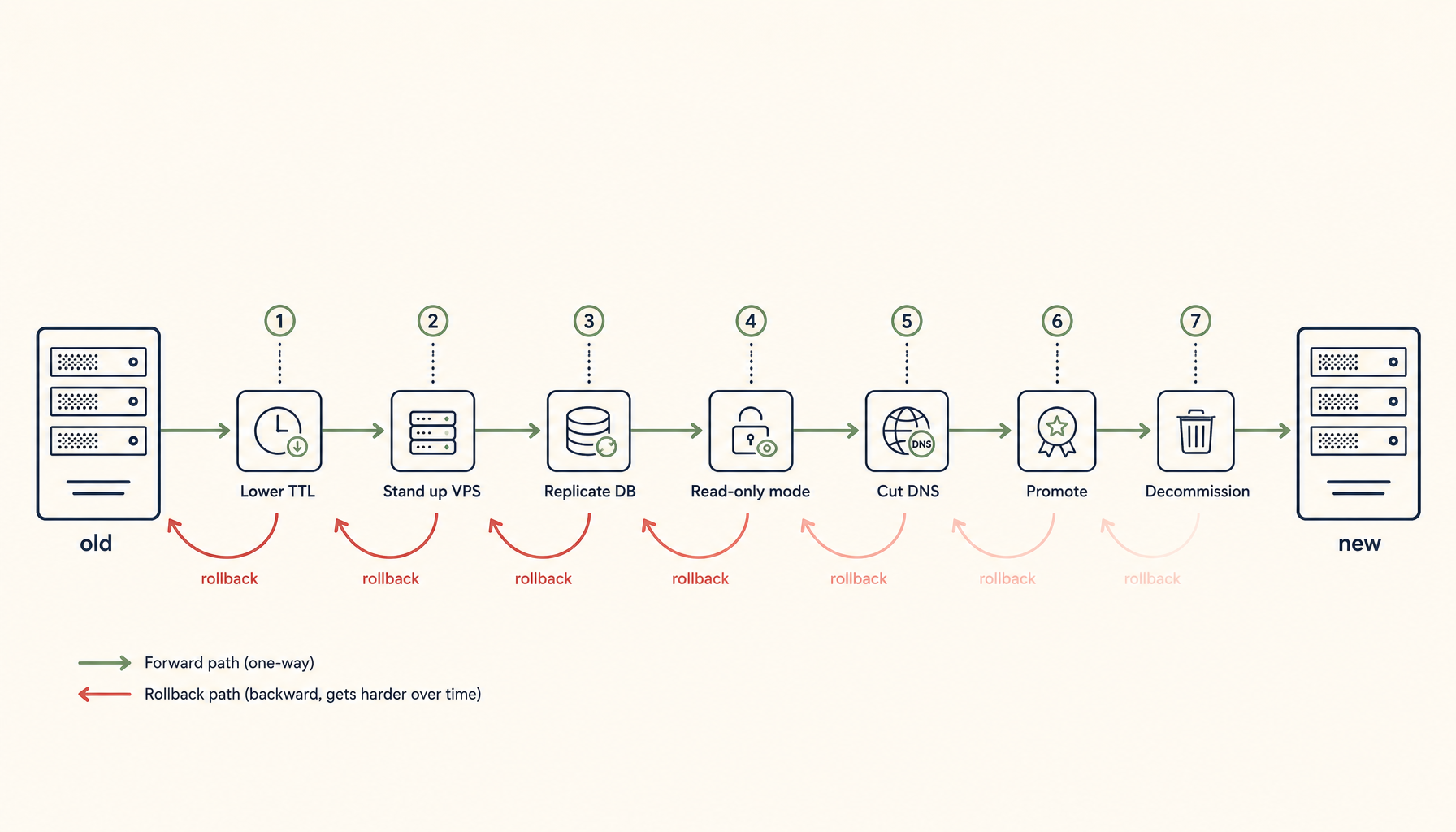
There are seven steps, and the order matters. Each step has a known rollback. Doing the steps in any other order leaves windows where rollback requires data reconciliation, which is the thing you are trying to avoid.
1. Lower the TTL on your DNS records (24 hours before)
Set the TTL on every record you will change to 60 or 300 seconds, a full day before you intend to cut over. DNS resolvers cache the old TTL until it expires. If your TTL is currently 86400 (the default in many providers), and you change the record at noon, resolvers can still send users to the old IP until the next noon. You cannot rollback through that window.
By lowering TTL a day in advance, you ensure that when you change records the next day, propagation is measured in minutes, not in hours.
Rollback at this step: none needed. Lowering TTL is reversible at any time and changes no behavior.
2. Set up the new VPS to its full final state (no public DNS)
Stand up the new VPS completely. Install the app, the database, the proxy, the certificates, the backup cron. Test it end-to-end using a hosts file entry on your laptop that pretends production DNS already points there. Run synthetic traffic. Confirm the app works the way it does on the old host.
This step takes the longest. It is also the cheapest to mess up: nobody depends on it yet.
Rollback at this step: delete the VPS. No production impact.
3. Replicate the database from old to new, ongoing
This is the load-bearing step. State B requires that both hosts read consistent data. The way to get that is replication: writes that happen on the old host show up on the new host within seconds. The two databases are slaves of one truth.
Three setups, in order of preference:
- Logical replication (Postgres or MySQL native). The new host subscribes to the old host's write stream. Both can serve reads; the old host serves all writes. This is the cleanest pattern.
- Trigger-based replication if logical isn't available on shared hosting. The old host writes a row, a trigger writes the same row to a queue table, a small bridge service ferries the rows to the new host. Slightly slower, fully workable.
- Application-level dual-write. The application, deployed to both hosts, writes every change to both databases. This is the last resort. It is brittle and produces drift if either host is unreachable.
Rollback at this step: stop replication. Both databases now drift, but the old host is still authoritative for production traffic. No user impact.
4. Switch the new VPS to read-only mode against its own database
Configure the new VPS so the application can read from its local database but cannot write. This is a 5-minute change at the application config level — flip a READ_ONLY=true env var, redeploy. The app on the new host now serves any request that does not modify state.
This is what makes state B safe. While DNS is split, both hosts serve reads from their respective databases (which are kept in sync by replication). Only the old host serves writes. There is exactly one writer; there is no conflict.
Rollback at this step: flip the env var back. The new host returns to its previous state. No production impact.
5. Cut DNS over to the new VPS
This is the moment the migration "happens" from a user perspective. Update the A or AAAA record(s) for your domain to point to the new VPS. Because TTL was lowered in step 1, propagation completes within 5–15 minutes for most resolvers.
Some users hit the new VPS immediately. Some users continue hitting the old host for the duration of the propagation window. Both hosts respond correctly because of step 4.
Rollback at this step: point DNS back at the old host. Within 5–15 minutes, traffic returns to the old host. No data was changed on the new host because of step 4.
6. Promote the new VPS to read-write, demote the old host to read-only
After DNS has propagated to nearly all resolvers (give it an hour to be safe), reverse the read-only flag. Set the new VPS to writable. Set the old host to read-only. Stop the replication direction so the old host is no longer being written to.
For roughly five minutes during this step, both hosts may briefly accept writes if a stray resolver still routes to the old host. This is the only window in the migration where conflict is theoretically possible. In practice, the volume of traffic to the old host at this point is so low that conflict almost never happens, and a brief read-only period on the old host before the swap eliminates it entirely.
Rollback at this step: flip the read-only flags back, point DNS at the old host. The migration unwinds, but you must reconcile any writes the new VPS accepted during step 6 against the old host's database. This is the first step where rollback is no longer "instant" — it is "ten minutes of careful reconciliation."
This is the step the migration narrows to. Everything before it is freely reversible. Everything after it requires reconciliation.
7. Decommission the old host
Wait at least 48 hours. Watch logs on both hosts. If the old host gets zero requests for that full window, you know DNS has fully propagated. Now you can shut down the old shared hosting plan.
Rollback at this step: complicated. The old shared hosting plan is gone. To "rollback" past this point means standing up a new instance somewhere, restoring from a backup, and re-pointing DNS. It is doable, but it is a real outage. After 48 hours, you should not need it.
The rollback test
Before any of the seven steps run, do a dry run of the rollback. Pick state B (the most dangerous one) and answer concretely:
- What command points DNS back at the old host?
- How long, after running it, until 95% of users are back on the old host?
- What state is the old host's database in? Is replication still flowing? Did it lag?
- If the new VPS accepted writes during the failure (it shouldn't have, because of step 4), how do those get reconciled?
If you cannot answer these in writing before the migration starts, you are not ready to migrate. The dry run is the migration plan. The rest is execution.
What the standard guides are missing
A standard "deploy your app to a VPS" guide ends at step 2 of the seven above. The guide is correct that step 2 produces a working VPS. It is silent on the question that actually blocks teams: can I undo this safely if it goes wrong?
The answer the seven steps give is: yes, at every step before step 6, the rollback is a single command and takes minutes. At step 6, the rollback requires light reconciliation. After step 7, the migration is committed and rollback means rebuilding from a backup.
That answer is what makes the migration tractable for a team that is not in pain. They are not migrating to escape an emergency. They are migrating to give themselves headroom for the next two years of growth. They will only do it if the path back is as clearly written as the path forward. The seven steps and their rollbacks are that path.
The boring infrastructure rule, which is true of every cutover and not just hosting migrations: every step of a migration is a temporary state. The migration is only as safe as the worst rollback at the worst-state step. Spend the time to make every step's rollback small. Then move forward, knowing you can move back.
Related in the StoicSoft network
If you're choosing a VPS provider or benchmarking real-world performance like the post above explores, StoicVPS is the StoicSoft network's independent tracker for VPS pricing, performance, and migration safety.