
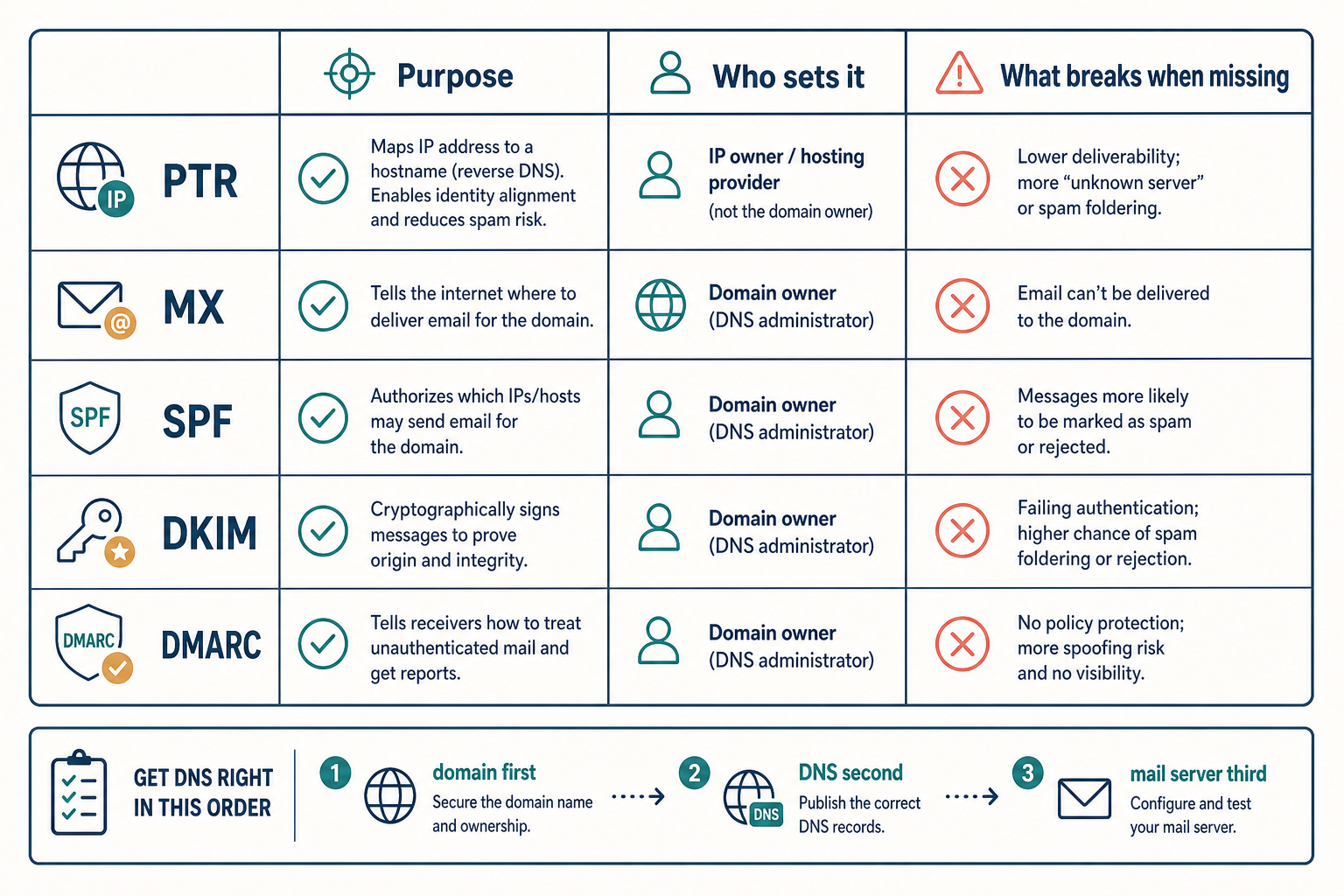
Short answer: yes. Set up the domain first, then DNS, then the mail server. Doing it in any other order will burn your IP reputation before your first email goes out.
Here's why the order matters and what to actually do.
Why "just spin up the server first" fails
Mail isn't like a web app. With HTTP, you can run on an IP address while you sort out DNS later — browsers don't care. With email, every receiving server (Gmail, Outlook, Fastmail, corporate Exchange) checks who you claim to be against DNS records before it accepts a single message.
If you start sending before DNS is in place, three things happen — fast:
- PTR / reverse DNS fails. Receivers see your IP, look up the PTR, and find a generic hostname like
vps-12345.provider.com. Most filters either reject or quarantine on this alone. - No SPF, DKIM, or DMARC records. Receivers can't verify your messages. They get marked spam, often silently.
- Your IP gets flagged. Spamhaus, Barracuda, and similar blocklists watch for new IPs sending unauthenticated mail. One bad day and you're on a list that takes weeks to get off.
By the time you "fix it later," your IP has a bad reputation and even correct configuration won't earn deliverability back quickly.
The right order
Step 1: Buy the domain
Cheap registrar is fine — Namecheap, Porkbun, Cloudflare Registrar all work. The only requirement: you must be able to manage DNS records. If your registrar bundles a locked-in DNS panel that doesn't let you add MX, TXT, and SRV records, switch nameservers to Cloudflare or another DNS provider before doing anything else.
Step 2: Verify you can set a PTR record on your VPS
Before anything else, confirm with your VPS provider that you can set a custom reverse DNS (PTR) record on your IPv4 (and IPv6 if you have one). Most reputable providers — Hetzner, OVH, Vultr, DigitalOcean, Linode — let you do this from the control panel.
If the provider blocks PTR changes or hasn't released your IP from a known "VPS pool" range, stop here. Pick a different provider. You can't run mail without a clean PTR.
Set the PTR to your planned mail server hostname:
123.45.67.89 → mail.example.com
The reverse must match the forward — mail.example.com must resolve back to 123.45.67.89.
Step 3: Add the DNS records
Add these to your domain's DNS zone before installing the mail server:
mail.example.com.       A     123.45.67.89
example.com.            MX    10 mail.example.com.
example.com.            TXT   "v=spf1 mx ~all"
_dmarc.example.com.     TXT   "v=DMARC1; p=quarantine; rua=mailto:[email protected]"
DKIM has to wait until the mail server generates its keypair (Step 5).
Step 4: Install the mail server
Now (and only now) install your mail stack. Common choices:
- Mailcow — Docker-based, full-featured, easiest "self-host everything" option
- Mail-in-a-Box — Single-script install, opinionated, great for one mailbox
- Stalwart — Newer, single binary, lower memory
- Postfix + Dovecot + Rspamd — Manual, maximum control
For most people building a personal or small-team mail server, Mailcow or Mail-in-a-Box save weeks.
Step 5: Add the DKIM record
After install, the mail server gives you a DKIM public key. Add it as a TXT record:
mail._domainkey.example.com. TXT "v=DKIM1; k=rsa; p=MIIBIjANBgkq..."
The selector (mail here) is set by your mail server's config. Match it exactly.
Step 6: Test before sending real mail
Use mail-tester.com or learndmarc.com:
- Send an email from your new server to the address they give you
- They score your setup out of 10
- Anything below 9 means there's a config issue — fix it before sending real mail
Also test:
# Forward DNS
dig mail.example.com +short

# Reverse DNS — must match
dig -x 123.45.67.89 +short

# SPF
dig TXT example.com +short

# DKIM
dig TXT mail._domainkey.example.com +short

# DMARC
dig TXT _dmarc.example.com +short
All five must return the expected values before you trust the setup.
Special case: subdomain for mail only
A common pattern is to use a subdomain (mail.example.com or mx.example.com) for the mail server, separate from your web server. This is fine and recommended — it lets you put your website on Cloudflare or a CDN without proxying mail (which Cloudflare won't do anyway).
The MX record points to the mail subdomain:
example.com.        MX   10 mail.example.com.
mail.example.com.   A    123.45.67.89
You still need SPF, DKIM, and DMARC on the bare domain (example.com), because that's the From: domain on outbound mail.
What if you already have a domain in use elsewhere?
If your domain is already serving a website on a different host, you can still add mail without disrupting anything. The MX record points to a separate IP, and SPF/DKIM/DMARC are TXT records that won't conflict with anything else.
Just make sure the existing SPF record (if any) is updated to include your new mail server's IP. Two SPF records on the same domain is a common mistake — there must be exactly one TXT record starting with v=spf1.
When you really shouldn't self-host mail
If you're sending more than a few hundred emails a day, or any of those are transactional (signup confirmations, password resets, receipts), use a transactional provider — Postmark, Resend, AWS SES — and only self-host inbound. Outbound deliverability at scale is a full-time problem and your IP reputation will lag the big providers' for months even with everything configured perfectly.
For personal mail, a small team, or a side project, self-hosting works fine — as long as you do the prerequisites in the right order.
Internal links
- Guide: VPS Security Baseline
- Guide: SSL Certificates with Let's Encrypt
- Tutorial: Self-Host Mailcow on a VPS
- ServerCompass: Mail server templates with PTR-clean providers
Related in the StoicSoft network
If you're choosing a VPS provider or benchmarking real-world performance like the post above explores, StoicVPS is the StoicSoft network's independent tracker for VPS pricing, performance, and migration safety.