
Your app worked all morning. Around lunch, half the requests start returning 502 — the other half work fine. You restart the proxy and everything's back to normal. By dinner it's broken again.
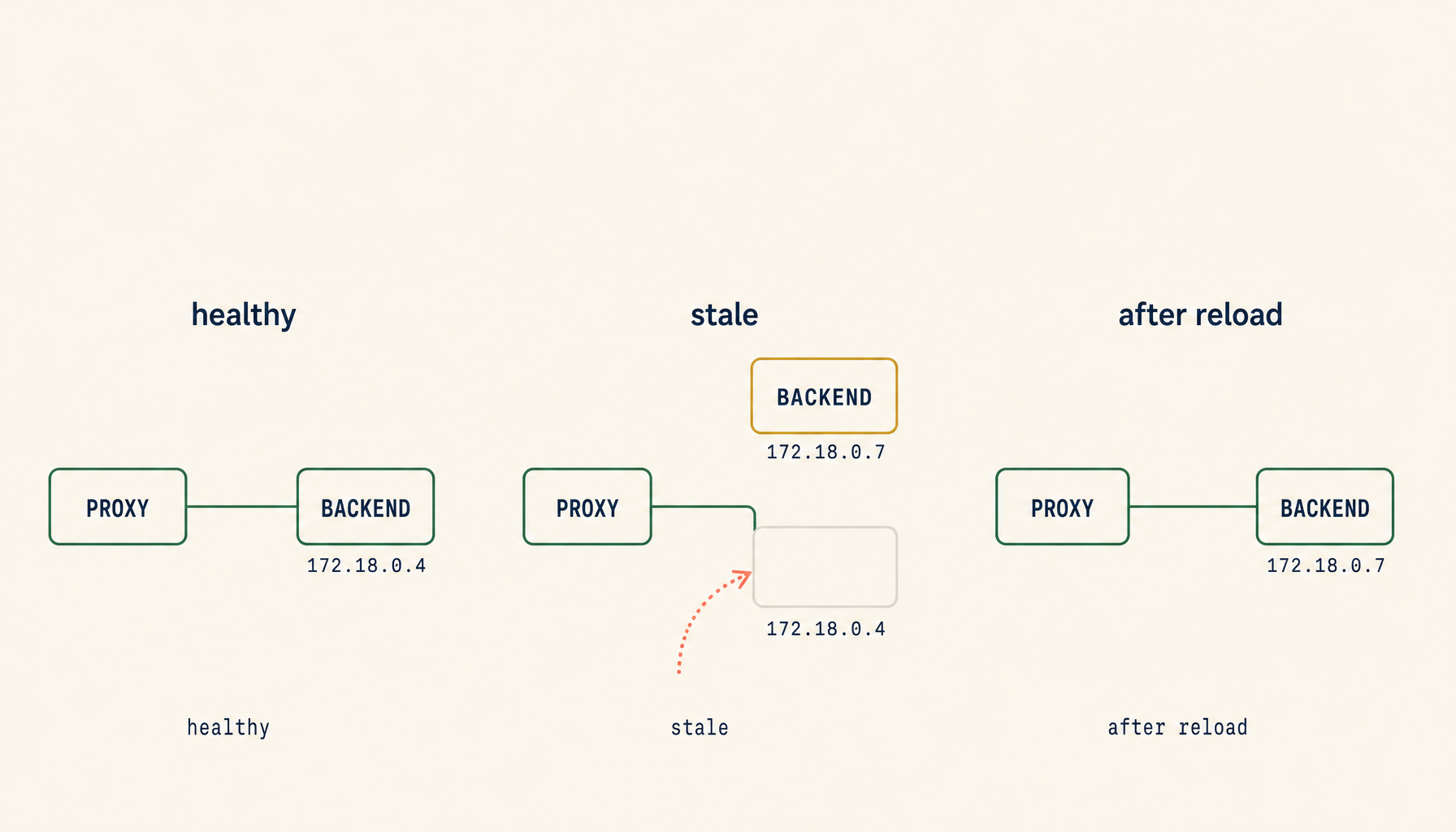
This is the most under-diagnosed failure mode in self-hosting. The proxy config is correct. The backend container is up and healthy. Curl from inside the backend container hits the app on the right port. But the route between the two has gone stale: the proxy is still pointing at an address that no longer answers, and it has no idea. A reload re-resolves the upstream and the symptom vanishes — until the next container recreate, network reattach, or DNS cache expiry.
The reason it keeps coming back is that none of the obvious checks find it. The proxy is "running." The backend is "running." Logs on either side look ordinary right up until the failures start. The bug lives in a piece of state nobody usually inspects: the proxy's cached idea of where the backend is.
What "stale upstream" actually means
When a reverse proxy forwards a request, it has to know the backend's address. That address comes from one of three sources: a hard-coded IP in the config, a hostname resolved through DNS, or a Docker service name resolved through Docker's embedded DNS at 127.0.0.11. In every case, the proxy resolves once and then caches the result — sometimes for the lifetime of the worker process, sometimes for a configurable TTL, sometimes until reload.
Stale upstream is what happens when that cached address stops being correct. The backend got recreated on a new IP. The container left and rejoined the network. A compose up -d replaced the service while the proxy stayed up. The DNS record TTL expired but the proxy never re-resolved. From the proxy's perspective everything is fine; it's still happily opening connections to the address it learned at startup. From the user's perspective, half their requests vanish into a black hole.
The defining tell is that a proxy reload — not a restart of the backend, a reload of the proxy — fixes it instantly. That is the diagnostic.
The five concrete causes
Container IP drift after recreate. When you docker rm and docker run a backend on the same user-defined network, Docker usually assigns it a new IP from the network's pool. Configs that hard-coded the old IP — proxy_pass http://172.18.0.4:3000; — keep pointing at an address that nothing answers on. Diagnose with docker inspect <backend> --format '{{range .NetworkSettings.Networks}}{{.IPAddress}} {{end}}' and compare to whatever the proxy config has baked in.
DNS caching inside the proxy process. Nginx is the loudest offender here. A bare proxy_pass http://backend:3000; resolves the name once at config-load time and never again. If the backend's IP changes, nginx happily forwards to the dead address forever. The fix is to declare a resolver and use a variable in the proxy_pass URL so nginx is forced to re-resolve on each request — covered in the fix patterns below.
Network reattach drift. Containers can be disconnected and reconnected to a network without restarting either container — docker network disconnect followed by docker network connect, or a compose change that rewires services. The new attachment usually gets a new IP, and proxies that cached the old one keep aiming at where the backend used to be. Run docker network inspect <net> and confirm the backend appears with the IP the proxy thinks it should have.
Dropped keepalive on a now-dead backend. Some proxies maintain long-lived TCP connections to upstreams to avoid handshake overhead. If the backend instance behind that connection silently dies — OOM kill, crash loop, segfault — the proxy can keep reusing a half-broken socket until it noticeably fails, often returning 502 or connection reset for a window of requests before opening a new connection. From inside the proxy container: docker exec <proxy> curl -v http://<backend>:<port>/healthz. If the curl fails but docker ps shows the backend running, you are probably staring at it.
Multiple-hostname route precedence misordering. Two server { server_name ... } blocks on the same listen port. The most-specific name should win, but if the request matches a wildcard in both, nginx falls back to whichever loaded first in lexicographic file order. Symptoms look intermittent because the "wrong" backend may be healthy most of the time. Diagnose with nginx -T 2>/dev/null | grep -E '^(server_name|listen|proxy_pass)' and read the first matching block by hand.
The 60-second triage script
Drop this into a file the next time intermittent 502s start. It runs the four highest-yield checks in order and prints exactly what's wrong.
#!/usr/bin/env bash
PROXY=${1:-nginx}
BACKEND=${2:-backend}
PORT=${3:-3000}

echo "1) Backend container exists and is running:"
docker ps --filter "name=^${BACKEND}$" --format '{{.Names}} {{.Status}}'

echo "2) Backend's current IP on each attached network:"
docker inspect "$BACKEND" --format \
  '{{range $k,$v := .NetworkSettings.Networks}}{{$k}}={{$v.IPAddress}} {{end}}'

echo "3) Proxy can reach backend by service name:"
docker exec "$PROXY" sh -c "curl -sS -o /dev/null -w '%{http_code}\n' --max-time 3 http://${BACKEND}:${PORT}/" \
  || echo "  unreachable from proxy netns"

echo "4) What the loaded proxy config thinks the upstream is:"
docker exec "$PROXY" nginx -T 2>/dev/null | grep -E 'proxy_pass|server_name' | head -20
If step 2 prints a different IP than step 4 references, you have IP drift. If step 3 fails but docker ps says the backend is up, you have a network attachment or keepalive issue. If step 4 shows a hard-coded IP at all, that is the bug — fix it before doing anything else.
The four fixes that eliminate the bug class
If you apply these four patterns, you will not have the stale-upstream symptom again.
Resolve by service name, not IP. When both containers are on the same Docker user-defined network, Docker's embedded DNS at 127.0.0.11 resolves service names to whatever address the container currently has. Use the service name in the proxy config and let Docker do the bookkeeping. A minimal nginx upstream looks like this:
server {
    listen 80;
    server_name app.example.com;
    location / {
        proxy_pass http://backend:3000;
    }
}
Combined with a compose file where both services share a network, this survives container recreates without touching the proxy.
Force re-resolution on a TTL. The above still has nginx's resolve-once-at-startup problem. The fix is one declaration plus a variable:
resolver 127.0.0.11 valid=10s ipv6=off;

server {
    listen 80;
    server_name app.example.com;
    set $upstream backend;
    location / {
        proxy_pass http://$upstream:3000;
    }
}
The variable in proxy_pass forces nginx to use the resolver at request time instead of at config-parse time. The valid=10s caps how long a resolved IP is trusted. Trade a tiny per-request lookup for an entire class of bug.
Use Traefik with Docker labels. Traefik watches the Docker socket for container events and rewrites its routing table the moment a backend appears, disappears, or moves. There is no upstream cache to go stale. A minimal label set on the backend service:
services:
  backend:
    image: ghcr.io/you/backend:latest
    labels:
      - "traefik.enable=true"
      - "traefik.http.routers.backend.rule=Host(`app.example.com`)"
      - "traefik.http.services.backend.loadbalancer.server.port=3000"
    networks: [web]
Recreate the container on a new IP and Traefik adjusts before the next request lands.
Healthcheck-driven removal. A proxy that pulls upstreams from a registry can drop unhealthy backends automatically — Traefik via Docker labels, Caddy with dynamic_upstreams, HAProxy with the runtime API. A proxy that doesn't will keep sending traffic at a dead address until you reload it. If you stay on plain nginx, at least add a healthcheck (upstream modules in nginx-plus, or nginx-upstream-dynamic-servers) so dead backends get marked down instead of silently failing requests.
Reload, don't restart
When you do need to shake out a stale resolution, use the reload path, not the restart path. Restart drops every in-flight connection. Reload keeps them and only refreshes the worker config.
- nginx:
nginx -s reload(ordocker exec nginx nginx -s reload). - Traefik: no manual action — it picks up Docker events automatically.
- Caddy:
caddy reload --config /etc/caddy/CaddyfileorPOST /loadagainst the admin API. - HAProxy: a hot reload via
haproxy -sf $(pidof haproxy)orsystemctl reload haproxy.
The reflex of docker restart nginx is fine for development. In production it kills user requests for no reason — every modern proxy supports a graceful reload, and the operational cost of using it is zero.
What this looks like in logs
Pattern recognition on the proxy log saves you the triage step entirely. These are the four phrases to scan for:
upstream timed out (110: Connection timed out) while connecting to upstream
connect() failed (111: Connection refused) while connecting to upstream
no live upstreams while connecting to upstream
host not found in upstream "backend"
Every one of these means the same family of problem: the proxy tried to talk to an address that did not answer. Connection refused is the classic IP-drift case — the address is still routable on the network but nothing is listening. Connection timed out usually means the IP is no longer attached to anything. No live upstreams is what happens when nginx has marked all members of an upstream block as failed. Host not found in upstream is the resolver giving up on a service name — usually because the backend container is gone entirely.
The deeper rule
Restarts are not a fix. They are a flag. Every "I restarted it and it worked" moment in self-hosting is the system telling you that some piece of state — a cached resolution, a half-open connection, a stale config — is not being refreshed when the world changes around it. Healthy infrastructure does not need to be restarted to stay correct.
Treat the proxy as the single piece of plumbing that has to trust its own routing table. If it doesn't, every other layer below it will look broken instead.