
Your backup script has run every night for 11 months. You have not once restored from it. What you have is not a backup — it is a hope.
This is the most common self-hosting failure mode that nobody admits. Backup jobs report success, archives accumulate, monitoring stays green, and the operator feels covered. Then a volume gets corrupted, a container deletes its own data on a bad migration, or a disk fails — and the first time the restore actually runs is during the outage. That is also when you discover the missing sidecar volume, the wrong mount path, the schema mismatch, and the encryption key you backed up inside the very volume you are trying to restore.
The confidence gap
A backup job verifies one thing: bytes were written somewhere. It does not verify that those bytes, restored into a fresh container, will boot the application and serve users. Those are different claims, and most self-host setups only test the first one.
The asymmetry is brutal. Backups run nightly. Restores run never. The first real restore is always under pressure, with stale documentation, half-remembered commands, and a ticking clock. By the time you find out the dump is incomplete, the original is already gone.
The fix is not better backup tooling. The fix is a scheduled, scripted exercise that proves the restore path actually works — on a normal Tuesday, while everything is healthy, and you have time to fix what you find.
What a restore drill actually is
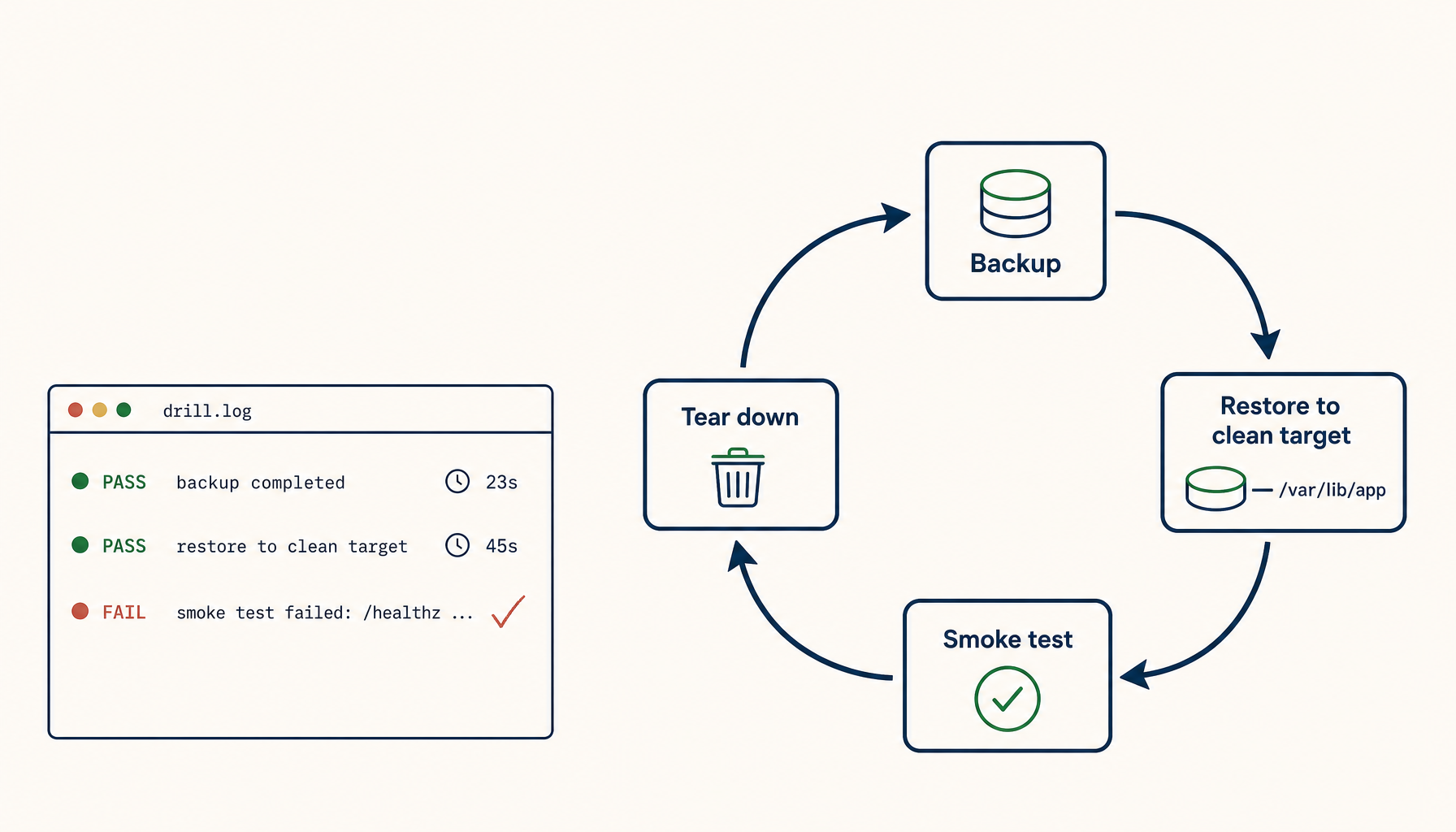
A restore drill is a small, repeatable workflow that:
- Spins up a clean target — a temp container, a sidecar volume, a separate VM, or a different volume namespace.
- Restores the latest backup into it.
- Boots the dependent application against the restored data.
- Asserts a known-good check — a login succeeds, a known row exists, an API smoke test returns 200.
- Tears the target down so it does not accumulate.
- Logs result and timing.
The drill is not "did the file copy back." The drill is "did the application come up, did the data look right, and how long did the whole thing take." That last bit matters more than people realize. Your recovery time objective lives or dies on actual restore duration, not on backup duration.
Concrete drill: Postgres in Docker
Most self-hosters have a Postgres volume somewhere. Here is the full loop end to end.
Backup, which you almost certainly already have:
docker exec pg pg_dump -U postgres myapp > /backups/myapp-$(date +%F).sql
The drill spins up a sidecar Postgres into a fresh volume, restores into it, and runs a smoke check:
# pick the most recent backup
LATEST=$(ls -1t /backups/myapp-*.sql | head -1)

# clean target
docker volume create pg_drill
docker run -d --name pg_drill \
  -e POSTGRES_PASSWORD=drill \
  -v pg_drill:/var/lib/postgresql/data \
  postgres:16

# wait for it to come up
until docker exec pg_drill pg_isready -U postgres; do sleep 1; done

# restore
docker exec -i pg_drill psql -U postgres -c "CREATE DATABASE myapp;"
cat "$LATEST" | docker exec -i pg_drill psql -U postgres myapp

# smoke check — known-good assertions
docker exec pg_drill psql -U postgres myapp -c "SELECT count(*) FROM users;"
docker exec pg_drill psql -U postgres myapp -c "SELECT MAX(created_at) FROM events;"

# teardown
docker rm -f pg_drill
docker volume rm pg_drill
The smoke check is the part most operators skip. Without it the drill only proves that psql did not error — which is a weak claim. The count(*) and MAX(created_at) together prove rows exist and the latest write is recent. If either looks wrong, the backup is wrong.
Concrete drill: bind-mount apps (Vaultwarden, Nextcloud)
Apps with bind mounts are different. The data lives in a host directory, often with strict UID/GID expectations. The drill needs to replicate those.
# assume a restic snapshot of /srv/vaultwarden/data
RESTORE_DIR=/tmp/drill-vaultwarden
rm -rf "$RESTORE_DIR" && mkdir -p "$RESTORE_DIR"

restic -r /backups/restic restore latest --target "$RESTORE_DIR"

# boot a fresh container against the restored data
docker run -d --name vw_drill \
  -p 18080:80 \
  -v "$RESTORE_DIR/srv/vaultwarden/data":/data \
  vaultwarden/server:latest

# smoke check — log in with a known test account
sleep 5
curl -fsS -X POST http://localhost:18080/identity/connect/token \
  -d "grant_type=password&[email protected]&password=$DRILL_PW&scope=api" \
  | grep -q access_token && echo PASS || echo FAIL

# teardown
docker rm -f vw_drill
rm -rf "$RESTORE_DIR"
Pick a port that does not collide with the live container, and use a separate test account that exists in the production data. If the login fails, your backup is missing something — usually the encryption key file, the config file, or the right ownership.
What the drill catches that the backup never tests
A nightly backup job tests storage. The drill tests reality. The recurring failure modes:
- UID/GID drift. A container rebuild changes the user inside the image —
999becomes1000, or the official image switches from root to a named user between minor versions. Restored files keep the old ownership. The app boots to permission denied on its own data directory. - Sidecar volumes you forgot. The database is backed up. The uploads directory, sitting in a sibling bind mount, is not. Or the Redis volume that stores session tokens is missing, and every user is silently logged out after restore.
- Env var coupling. The restored data references a secret that lives in
.envon the host — a database encryption key, an OIDC client secret, an SMTP password. The host is gone. The data is technically intact and practically unreadable. - Schema migrations not in the backup. You upgraded the app last week, the migration ran in place, but the dump was taken before the migration. The restored DB does not match the new app version. The app refuses to start, or worse, starts and corrupts further.
- The wallet inside the safe. The encrypted volume's key is itself stored in the encrypted volume — Vaultwarden's
rsa_key.pem, a LUKS keyfile, a SOPS age key. You can restore the file. You cannot open it. - RTO blown by restore time. A 200 GB Postgres restore that takes four hours is not a backup if your tolerance is one. Compressed dumps decompress slowly. WAL replay is single-threaded. You learn this only by timing it.
You do not find these on a quiet Tuesday by reading documentation. You find them by running the drill — and you fix them when there is no clock running.
A realistic cadence
Drill weekly for production data. Drill monthly for "we would survive losing this" data. Rotate which backup you restore from — sometimes latest, sometimes seven days old, sometimes thirty days old. Old backups catch retention bugs: the prune script that silently stopped working, the cron job that silently stopped writing six weeks ago, the bucket that hit a quota and started rejecting uploads while the local job kept reporting success.
If you only have time for one drill per month, drill against a backup that is at least a week old. That catches the failure mode where last night's backup happens to work but everything before it is corrupt — which is exactly the situation you end up in when you discover corruption a few days after it started, and the only "good" backup is older than you remembered.
Make it a script, not a habit
Habits die. Scripts run on cron. The skeleton:
#!/usr/bin/env bash
# /usr/local/bin/restore-drill.sh
set -euo pipefail

START=$(date +%s)
TARGET=/tmp/drill-$(date +%s)
LATEST=$(ls -1t /backups/myapp-*.sql | head -1)

cleanup() {
  docker rm -f pg_drill 2>/dev/null || true
  docker volume rm pg_drill 2>/dev/null || true
  rm -rf "$TARGET"
}
trap cleanup EXIT

docker volume create pg_drill >/dev/null
docker run -d --name pg_drill -e POSTGRES_PASSWORD=drill \
  -v pg_drill:/var/lib/postgresql/data postgres:16 >/dev/null
until docker exec pg_drill pg_isready -U postgres >/dev/null 2>&1; do sleep 1; done

docker exec -i pg_drill psql -U postgres -c "CREATE DATABASE myapp;" >/dev/null
cat "$LATEST" | docker exec -i pg_drill psql -U postgres myapp >/dev/null

ROWS=$(docker exec pg_drill psql -U postgres myapp -tAc "SELECT count(*) FROM users;")
ELAPSED=$(( $(date +%s) - START ))

if [ "$ROWS" -gt 0 ]; then
  RESULT="PASS rows=$ROWS elapsed=${ELAPSED}s backup=$(basename "$LATEST")"
else
  RESULT="FAIL rows=$ROWS elapsed=${ELAPSED}s backup=$(basename "$LATEST")"
fi

echo "$(date -Iseconds) $RESULT" >> /var/log/restore-drill.log
curl -fsS -d "$RESULT" https://ntfy.sh/your-drill-channel >/dev/null
Run it from cron. If the notification stops arriving, the drill is broken — which is exactly the signal you want, weeks before an actual outage.
The two failure modes that humble everyone
Two patterns repeat across every operator who has been through a real restore:
The first is the out-of-volume dependency. You restore the data perfectly. The app boots in a half-broken state because something outside the volume — a config file under /etc, an environment variable, a TLS certificate, a Cloudflare API token — was never part of the backup. The data is fine. The system is not. Fix: every drill should boot the app on a host without that external state and see what breaks.
The second is RTO denial. The restore works, but it takes four hours, and your business needed it back in one. You did not have a backup problem; you had a restore-time problem. Fix: time every drill, log it, and treat regressions in restore time as bugs.
A backup is a claim. A drill is a proof. Until you have run the restore, you have one of these and not the other — and the difference only becomes visible when it is too late to fix.
Related in the StoicSoft network
If you run monitoring, uptime checks, or alerting across self-hosted apps like the ones above, ServerCompass is the StoicSoft network's tool for wiring tiered severity, flap suppression, and low-noise alerts into a single dashboard.